
What Is a RevOps Tech Stack? Core Tools Explained
New to RevOps? Learn what a RevOps tech stack is, the core tool categories you need, and how to build one without wasting budget.
By Rishabh, Revlyn ·
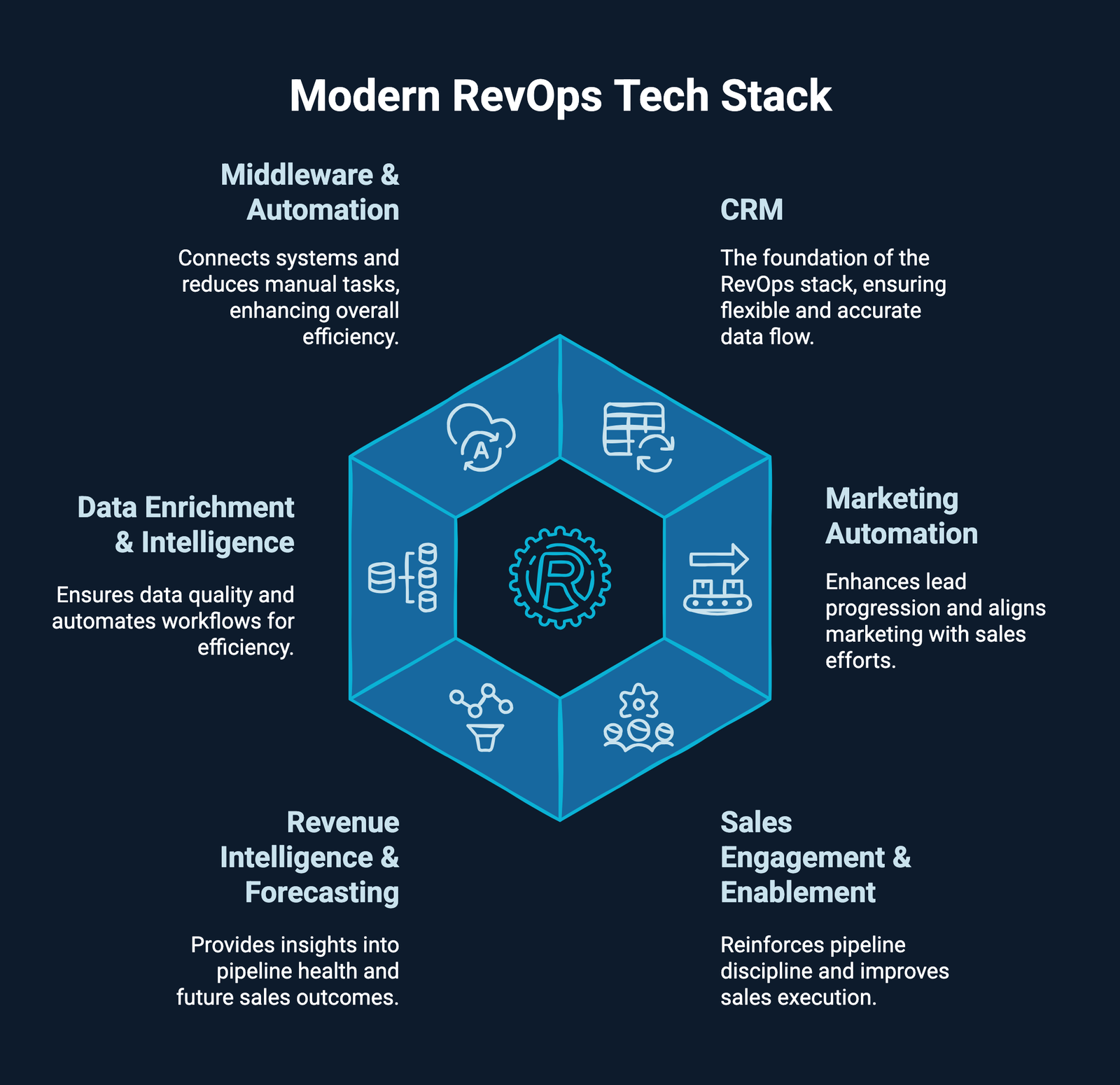
A RevOps tech stack is the set of connected software tools that let your sales, marketing, and customer success teams share the same data and work off the same playbook. At minimum, it includes a CRM, marketing automation, sales enablement, and reporting tools, all wired together so information moves automatically instead of living in separate spreadsheets.
If you’ve ever had a deal stall because sales didn’t know a prospect had already talked to support, you’ve felt what happens without one. Tools that don’t talk to each other create blind spots, and blind spots cost you revenue.
Let’s get into what actually makes up a RevOps tech stack, why it matters, and how to start building or fixing yours.
What Is RevOps, Quickly?
Before we talk tools, a quick definition. Revenue operations (RevOps) is a business function that aligns sales, marketing, and customer success teams around shared data, processes, and goals so the whole revenue engine works as one system instead of three disconnected departments.
RevOps isn’t a piece of software. It’s a way of running the business. The tech stack is just the infrastructure that makes that alignment possible day to day.
What Is a RevOps Tech Stack?
A RevOps tech stack is the collection of software tools and technologies that let revenue teams (sales, marketing, and customer success) work together instead of in silos. The goal isn’t to buy more software. It’s to make sure the software you already have shares data cleanly, so nobody’s working off stale or conflicting numbers.
Most stacks lean on native integrations (built-in connections between two tools) and custom workflow automation to keep everything synced. Think of it less as a shopping list and more as plumbing: every pipe needs to connect, or the water backs up somewhere.
Why Does a RevOps Tech Stack Matter?
Here’s the problem most teams run into: tools that don’t sync create broken handoffs. When systems don’t talk, deals slip through the cracks between marketing, sales, and customer success. That leads directly to forecasting gaps, because disconnected data means unreliable pipeline projections and missed revenue targets.
There’s also a hidden cost. Manual workarounds and duplicate records quietly cost you deals you should have won. Nobody notices this on a dashboard. It just shows up as a slower quarter.
On the flip side, a well-connected stack turns raw activity data into decisions you can act on, instead of just numbers you report on. Gartner had projected that by 2025, 75% of the highest-growth companies globally would be running on some form of RevOps model, which tells you this isn’t a niche practice anymore. It’s becoming the default for companies that plan to scale.
What Are the Core Tool Categories in a RevOps Stack?
You don’t need every category from day one. But here’s what shows up in most functioning stacks, from foundation to nice-to-have.
1. CRM (Customer Relationship Management)
Your CRM is the central hub where customer and prospect data lives: contact info, deal stages, past conversations, purchase history. Salesforce and HubSpot are the two most common choices. Everything else in your stack should ultimately feed data into, or pull data from, this system.
2. Marketing Automation
These tools handle attracting, nurturing, and converting leads while keeping marketing and sales working from the same lead definitions. Without this connected to your CRM, marketing generates leads sales never sees clearly, or worse, leads get followed up twice by two different reps.
3. Sales Enablement
This covers everything that helps reps sell more effectively: sales content management, onboarding and training materials, automated outreach sequences, and battlecards for handling objections. It’s the layer between “we have leads” and “we closed the deal.”
4. Revenue Intelligence and Forecasting
These tools analyze deal activity, call data, and pipeline trends to flag risk and predict what will actually close. This is a newer category, but it’s quickly becoming a must-have alongside CRM and lead routing tools.
5. CPQ (Configure, Price, Quote) and Billing
CPQ software streamlines quoting and approvals, which matters most once your pricing or packaging gets complicated. Billing and revenue recognition tools then automate invoicing and subscription management so finance and go-to-market teams work from the same numbers. Don’t rush into CPQ before your pricing model is settled, it’ll just lock in confusion.
6. Customer Success Platform
This tracks health scores, usage data, and renewal risk after the deal closes. RevOps stacks increasingly stretch across the full customer lifecycle now, not just the sales funnel, covering everything from first anonymous website visit through renewal and expansion.
7. Analytics and Reporting
One of the core jobs of RevOps is giving leadership a single, trustworthy view of revenue performance. That requires a centralized reporting layer that pulls data across every tool in the stack instead of forcing someone to stitch together three exports in a spreadsheet every Friday.
8. Integration and Data Quality Tools
Middleware tools like Workato or Zapier handle the connections between systems that don’t integrate natively. This is the unglamorous layer, but it’s often the difference between a stack that works and one that just looks good in a slide deck. Data quality determines whether your stack delivers real insight or just amplifies bad data faster.
How Do You Actually Build a RevOps Stack?
You don’t build this in one sprint, and honestly, most teams shouldn’t try. Here’s a practical order of operations:
- Audit what you already have. Most B2B teams already own a CRM and probably more tools than they realize. Map what exists before buying anything new.
- Define your core metrics first. Pick a small number of KPIs, like customer acquisition cost, sales cycle length, or customer lifetime value, before you evaluate a single new tool.
- Fix the CRM before adding layers. If your CRM data is messy or your sales process isn’t reflected accurately in it, no new tool will fix that. Automation on top of a broken process just breaks things faster.
- Add tools by outcome, not by category checklist. Only add a layer (CPQ, revenue intelligence, CS platform) when it solves a specific, named problem you can point to.
- Build for integration, not isolation. Favor tools with strong native integrations so you’re not stuck building brittle custom connections for everything.
- Review and cut regularly. Audit your tech spend on a schedule and eliminate redundant or underused tools, especially ones with overlapping functionality.
Pro tip: before you buy a single new tool, write down the exact workflow that’s broken today (“leads sit in marketing’s tool for 3 days before sales sees them”) and work backward from that. Buying tools to solve a vague feeling of disorganization almost never works.
Honestly, most “RevOps tech stack” problems we see aren’t a tooling gap at all, they’re a process and ownership gap that a new tool gets blamed for. Adding software on top of an undefined sales process just automates the confusion faster.
Quick Checklist: Is Your Stack RevOps-Ready?
- CRM is the single source of truth, not one of three
- Marketing and sales use the same lead definitions and stages
- Deal, usage, and support data are visible to all three teams
- You can build a full-funnel report without exporting to a spreadsheet
- Every tool in the stack has a clear owner
- You’ve audited tool spend in the last two quarters
If you’re missing three or more of these, that’s a sign your stack is growing faster than your operations discipline.
Frequently asked
Do I need a dedicated RevOps tool, or can I use my existing CRM?
Most B2B teams already have the core pieces (a CRM, some marketing tool, maybe a reporting dashboard). The real work usually isn’t buying new software, it’s configuring and connecting what you’ve already got.
How many tools should be in a RevOps stack?
There’s no fixed number. The right size depends on your revenue complexity: a small B2B team might run fine on a CRM plus one or two connected tools, while an enterprise org juggling multiple pricing tiers will need CPQ, contract management, and revenue intelligence layered in too.
What’s the difference between a RevOps stack and a sales stack?
A sales stack only covers tools sales reps use to close deals. A RevOps stack spans marketing, sales, and customer success, plus the integration and reporting layer that connects all three.
Is HubSpot or Salesforce better for a RevOps tech stack?
Both serve as a strong CRM foundation. HubSpot tends to appeal to teams that want built-in automation and reporting without heavy engineering, while Salesforce is often chosen for its depth of customization on complex, enterprise-level requirements.
How much should a RevOps tech stack cost?
There’s no universal benchmark, since it scales with headcount and deal complexity. What matters more than the total spend is whether you’re tracking ROI against clear KPIs like CAC, sales cycle length, or customer lifetime value after every new tool addition.
Where to Go From Here
A RevOps tech stack isn’t about owning the most tools. It’s about making sure the tools you have actually talk to each other and reflect how revenue really flows through your business. Get the foundation (a clean CRM and clear process) right before you stack anything else on top.
Practical CRM notes, once a month.
HubSpot tips, RevOps playbooks, and what is working for growing revenue teams. Short, useful, and never salesy.