
7 CRM Factors for Midmarket SaaS Teams in 2026
Choosing a CRM at midmarket scale isn’t about features anymore. Here are the seven factors that actually separate revenue operations platforms once you’ve outgrown “which tool should we buy.”
By Rishabh, Revlyn ·
As B2B teams get leaner and buyers get pickier, more of the revenue engine is running on software. Sales reps are expected to cover more accounts. Marketers are expected to prove pipeline, not just clicks. And the tool sitting in the middle of all of it, your CRM, is either multiplying your team’s effort or quietly draining it.
That’s why the CRM decision has quietly become an automation decision. You’re not just buying a database of contacts anymore. You’re choosing the system that will route your leads, trigger your follow-ups, sync your marketing and sales data, and tell you what’s actually working.
Get it right, and a five-person team can operate like fifteen. Get it wrong, and you’ll spend the next two years paying for workarounds, duct-tape integrations, and a sales team that lives in spreadsheets anyway.
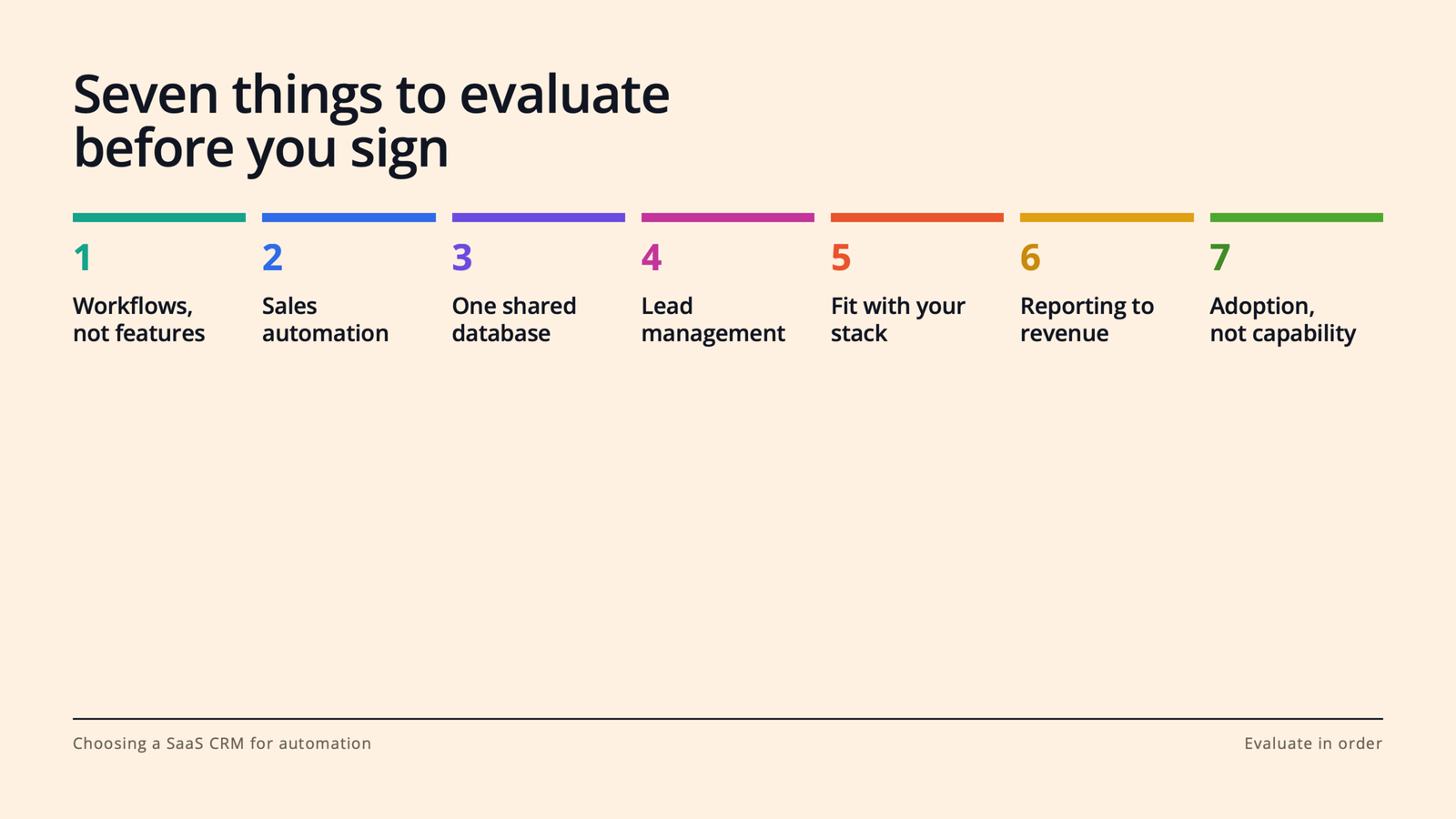
In this guide, we’ll walk through what a SaaS CRM actually needs to do for a modern revenue team, and the seven things to evaluate before you sign anything.
What is a SaaS CRM, and why does automation change the buying criteria?
What is a SaaS CRM? A SaaS CRM is customer relationship management software delivered in the cloud on a subscription basis. No servers to maintain, no versions to install; you log in, your data lives centrally, and updates ship continuously. For most B2B teams, it’s the system of record for every contact, company, deal, and conversation.
Why does automation change how you should buy one? Because the value of modern CRM platforms no longer comes from storing information. It comes from acting on it. The best platforms watch for signals (a form fill, a stalled deal, a pricing-page visit) and do something useful without a human lifting a finger: assign the lead, send the follow-up, alert the rep, update the forecast.
That means the old evaluation checklist (“Can it hold our contacts? Can we build a pipeline view?”) is table stakes. The real questions are about workflows. Which brings us to the list.
1. Start with the workflows you want to automate, not the feature list.
Every CRM vendor will hand you a feature grid with 200 rows of checkmarks. Ignore it, at least at first.
Instead, sit down with your sales and marketing leads and write out the five to ten workflows that eat the most time or leak the most revenue today. For most B2B SaaS teams, the list looks something like this: routing inbound leads to the right rep, following up on demo requests within minutes, nurturing leads that aren’t ready to buy, reminding reps when deals go quiet, and handing off closed-won customers to onboarding.
Now evaluate every CRM against that list. Can it run each workflow natively? How many clicks does it take to build? Does it require an admin, a consultant, or (worst case) a developer?
This flips the power dynamic in the sales process. You’re no longer being sold features; you’re testing the product against your actual business. Vendors that are a good fit will love this exercise. Vendors that aren’t will get vague. That vagueness is data.
2. Look for sales automation that removes admin work, not judgment.
Here’s a useful rule of thumb: good sales automation takes the robot work away from humans. Bad sales automation tries to take the human work away from humans.
The robot work is everything your reps do that a machine should be doing: logging emails and calls, creating tasks, updating deal stages, scheduling meetings, sending the third polite “just bumping this” follow-up. Research on sales productivity has found reps spend well under half their time actually selling, and admin is the biggest culprit. Every hour of it you automate goes straight back into conversations with buyers.
So when you evaluate CRM platforms, look for automatic activity logging (email and calendar sync that just works), sequences or cadences for multi-step follow-up, meeting scheduling links, and workflow triggers like “if a deal hasn’t been touched in 10 days, create a task and notify the owner.”
Then watch for the trap: automation that sends generic, robotic outreach at scale. Your buyers can smell it, and it burns your domain reputation and your brand at the same time. The platform should make personalization faster (templates with smart tokens, AI-assisted drafts a rep can edit), not make it optional.
3. Make sure marketing automation and sales live on the same database.
This is the single biggest structural decision in the whole evaluation, and it’s the one teams most often get wrong.
Plenty of companies buy a CRM for sales and a separate marketing automation tool for email, forms, and nurturing, then wire the two together with a connector. On paper, it works. In practice, you’ve just created two versions of the truth. A lead updates their job title in one system and not the other. Marketing thinks a lead is nurturing; sales already closed them. Attribution reports disagree with pipeline reports, and now your Monday revenue meeting is a debate about whose numbers are right.
Mistrust and miscommunication flare. Efficiency tanks.
The alternative is a platform where marketing automation and the sales CRM share one contact record. When a prospect opens an email, visits your pricing page, or fills out a form, the rep sees it in the same timeline where they log calls. When sales disqualifies a lead, marketing’s nurture logic knows instantly.
If you do end up with separate tools (sometimes there are good reasons), scrutinize the sync: Is it real-time and two-way, or a nightly batch job? What happens on conflicts? Who owns field mappings? Ask to see it working, not just a slide about it.
4. Get specific about lead management: capture, routing, scoring, and lifecycle.
“Lead management” is one of those phrases that appears on every vendor’s website and means something different at every company. Pin it down. A CRM worth buying should handle four distinct jobs:
Capture. Forms, chat, meeting links, and ad integrations (think LinkedIn Lead Gen Forms) that feed leads into the CRM automatically, with source data attached.
Routing. Rules that assign leads instantly by territory, segment, or round-robin. Speed matters enormously here; the odds of connecting with a lead drop off a cliff within the first hour, so “a rep will get to it tomorrow” is a revenue leak, not a process.
Scoring and prioritization. The ability to rank leads on fit (does this match our ICP?) and behavior (what have they actually done?), so reps work the best leads first instead of the newest.
Lifecycle stages. A shared definition of subscriber, lead, MQL, SQL, opportunity, and customer that both marketing and sales agree on, enforced by the system rather than by tribal knowledge.
If a platform makes you bolt on third-party tools for two or three of these, factor that into the real price.
5. Audit how it fits your existing stack.
Your CRM will not live alone. It has to play nicely with your email and calendar, your data warehouse, your support desk, your billing system, and whatever else your team already depends on, whether that’s Slack, Snowflake, Stripe, or a homegrown product database.
Three questions to ask every vendor:
Does it integrate natively with our core tools? Native integrations are maintained by the vendor and tend to be sturdier than anything held together by middleware.
How good is the API? Even if you never plan to touch it, a well-documented API is your escape hatch for the use case you haven’t thought of yet.
What does the ecosystem look like? A healthy app marketplace means that when you adopt a new tool in two years, the connector probably already exists, for the low price of free ninety-nine (or at least without a services engagement).
One more thing: ask about data portability on the way out. A vendor confident in their product will make exporting easy. A vendor relying on lock-in will not, and that tells you something.
6. Demand reporting that connects marketing activity to revenue.
Automation without measurement is just motion. The whole point of putting sales and marketing on one platform is that you can finally answer the questions that matter: Which campaigns create pipeline, not just leads? Where do deals stall? Which rep behaviors correlate with wins? What’s our real cost per opportunity by channel?
In your evaluation, don’t settle for the demo dashboard (it’s always gorgeous). Bring three reports your leadership team actually asks for today, and ask the vendor to build them live with sample data. You’ll learn more in that 20 minutes than in the rest of the sales cycle combined.
And check the AI story here, too. The current generation of CRM platforms is adding forecasting, deal-risk signals, and natural-language reporting. You don’t need all of it on day one, but you do want a vendor that’s clearly investing in it.
7. Weigh adoption as heavily as capability.
Here’s the uncomfortable truth about CRM projects: the most common failure mode isn’t missing features. It’s a sales team that won’t use the thing.
A CRM only automates well if the data going in is clean and complete, and that only happens when reps want to live in it. So in your trial, put actual reps (not just ops) in the product for a week. Watch where they hesitate. Count the clicks to log a call or update a deal. Ask them, honestly, whether they’d use it without being nagged.
Then look at the operational side of adoption: How long is implementation, really? Do you need a certified admin or an agency to make changes? What does onboarding and support cost? And how does pricing scale as you add seats, contacts, and automation volume? A platform that’s affordable at 10 seats and punishing at 50 is a decision you’ll have to unmake later, mid-growth, when you can least afford the disruption.
Final thoughts
Choosing a SaaS CRM for automation isn’t really a software decision. It’s a decision about how your revenue team will work for the next three to five years: how fast leads get touched, how aligned marketing and sales stay, and how much of your team’s week goes to selling instead of admin.
So start where we started. Write down the workflows that matter, put two or three CRM platforms through a real trial against them, and let your reps and your reports cast the deciding votes.
The teams that win with automation aren’t the ones with the longest feature list. They’re the ones whose system quietly handles the busywork so the humans can do the part humans are great at: building relationships and closing deals. Pick the platform that makes that your default, and you won’t just keep up with where B2B buying is going. You’ll be ready for it.
Practical CRM notes, once a month.
HubSpot tips, RevOps playbooks, and what is working for growing revenue teams. Short, useful, and never salesy.